OBRA · BRAVODAW gratis con IA per Mac

BRAVO, lo studio che lavora da solo.

Gli dici cosa vuoi e mixa, masterizza e produce con i tuoi suoni.
  • Beta gratuita
  • Mac con Apple Silicon
  • Funziona con Claude, Codex e Cursor
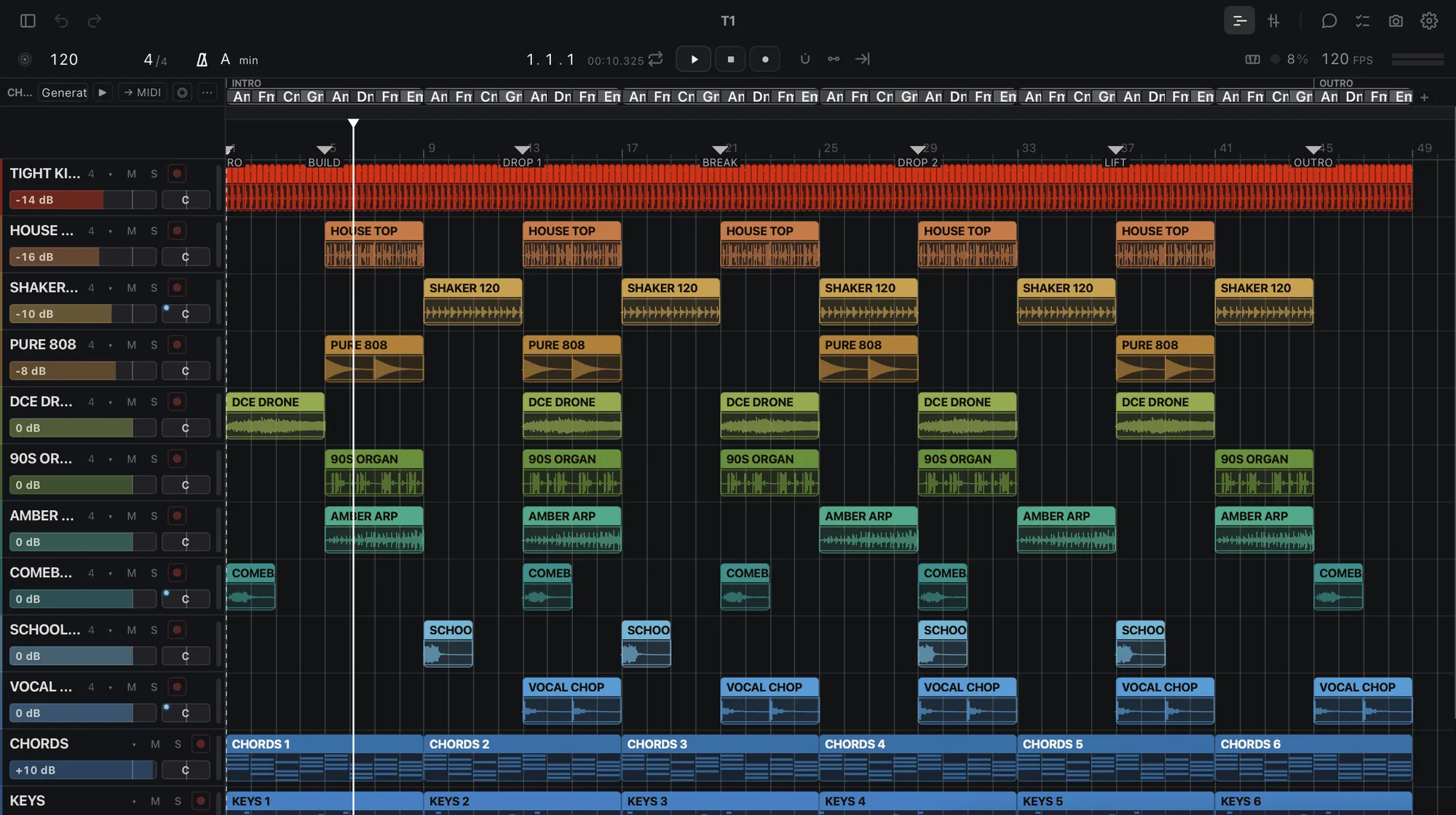
BRAVO arrangement view with 12 tracks

BRAVO

Masterizza questi 12 brani a −14 per Spotify

Fatto. 12 master a −14 LUFS, true peak a −1 dB o meno, e un report.

file pronti

Master

−14LUFS

WAV 24

Cosa fa oggi

Chiedi il lavoro. Ricevi i file.

Masterizza un brano o un album

Con la catena di mastering di BRAVO, al loudness che chiedi (−14 LUFS di default) e con il true peak a −1 dB o meno. WAV a 24 bit.

Elabora una cartella

Scegli una cartella e ogni file esce con lo stesso loudness e lo stesso picco, in WAV a 24 bit (o FLAC dalla tua IA), con un report.

Separa gli stem

Voce, batteria, basso e il resto di un brano, in quattro WAV, sul tuo Mac.

Giudica un mix

Fino a tre cose che non vanno, e come sistemarle una per una.

Intona una voce

Apre la tua voce in TUNE per una correzione d’intonazione naturale, a orecchio.

Impara il tuo suono

Impara dai tuoi progetti di Ableton e FL Studio, sul tuo computer.

Consegna gli stem

Esporta un WAV per traccia per il tuo editor o il tuo DAW.

Più avanti: mixare i tuoi stem, voce + base e mastering su un riferimento.

Lo guida la tua IA

Funziona con Claude, Codex e Cursor.

Usa la sua chat o chiedi dall’assistente che usi già. BRAVO lavora con i tuoi sample, ascolta il risultato e ti dice cosa non va. Non genera brani.

claude · codex · cursor
  • >masterizza questi 10 brani a −14 per Spotify
  • lookalbum letto: 10 tracce, 38 min
  • domaster × 10 → file
  • okfatto. 10 master a −14 LUFS, true peak a −1 dB o meno
  • >cosa non va nella traccia 7?
  • doascolto + giudizio
  • okimpastato a 200 Hz, voce bassa di 2 dB, troppo largo sotto i 120 Hz
LOOKLegge il progettouna chiamata
CANCosa si può fare quiuna chiamata
DOEsegue il lavoroun annulla
ASKInterroga il progettotesto semplice

DAW gratis con IA per Mac

Un DAW con l’IA dentro, gratis sul tuo Mac.

BRAVO è un DAW per Mac con Apple Silicon: tracce, clip, mixer e strumenti ed effetti propri. In più ha un’IA nella schermata Home. Dici cosa vuoi con parole tue, BRAVO fa il lavoro sul tuo audio e ti consegna i file.

Oggi masterizza un brano o un album, elabora una cartella, separa gli stem, giudica un mix, apre una voce in TUNE, impara dai tuoi progetti di Ableton Live e FL Studio ed esporta gli stem. Ogni modifica in un progetto si annulla in un solo passaggio.

Può guidarlo anche l’IA che usi già. Attiva «Connect your AI» e Claude, Codex o Cursor leggono il progetto, fanno il lavoro, controllano il risultato con le misure di BRAVO e ti dicono cosa è cambiato.

Il lavoro sull’audio si fa sul tuo Mac e la tua musica resta tua. La beta è gratuita e si apre a ondate dalla lista d’attesa.

  • DAWTracce, clip, mixer, strumenti ed effetti.
  • IAUna chat che fa il lavoro, più l’IA che usi già.
  • MacApple Silicon, da M1 in poi.
  • GratisLa beta non costa niente.

Beta gratuita

A ondate. Si parte dal Mac.

  • GratisLa beta non costa niente.
  • MacApple Silicon. Windows più avanti.
  • OndateIscriviti e ti scriviamo una volta, quando tocca a te.
  • TuaLa tua musica resta tua. Non la usiamo per l’addestramento.
  • PrivacyLa telemetria è facoltativa e non include mai l’audio né quello che scrivi.

OBRA · BRAVO

Entra in lista d’attesa

Verifica del tuo accesso…

Domande

Domande frequenti

BRAVO è gratis?

Sì. La beta è gratuita. L’IA integrata di BRAVO ha un limite giornaliero, più alto con OBRA PRO, lo stesso abbonamento del resto di OBRA. Mastering, elaborazioni in batch, stem ed esportazioni girano sul tuo Mac e non consumano IA.

BRAVO funziona su un Mac Intel o su Windows?

Per ora no. La beta è per Mac con Apple Silicon (M1 o successivi). Windows arriverà più avanti. Se ti iscrivi da un altro computer, ti teniamo il posto.

BRAVO fa la musica al posto mio?

No. BRAVO non genera brani. Lavora con il tuo audio e i tuoi sample: masterizza, separa, giudica ed esporta quello che porti, ascolta il risultato e ti dice cosa non va.

Quale IA funziona con BRAVO?

BRAVO ha la sua chat nella schermata Home. Funziona anche con Claude (Claude Desktop e Claude Code), Codex e Cursor tramite «Connect your AI», un connettore che resta spento finché non lo attivi e risponde in locale, sul tuo Mac.

Che formati di file usa?

Legge WAV, AIFF, FLAC, MP3 e gli altri formati audio comuni. Scrive WAV a 24 bit, e l’elaborazione di una cartella può scrivere anche WAV a 16 bit o FLAC. Legge i progetti di Ableton Live e FL Studio per imparare come lavori.

Funziona sul mio Mac o nel cloud?

Sul tuo Mac. Mastering, batch, separazione degli stem ed esportazioni girano sul tuo computer e il tuo audio non viene caricato online. Per accedere e per la chat IA integrata serve una connessione a internet.

In quali lingue è disponibile BRAVO?

L’app è in inglese e spagnolo.

Come ottengo l’accesso?

Iscriviti alla lista d’attesa da questa pagina. L’accesso si apre a ondate: quando tocca a te ricevi una email, accedi qui, accetti i termini della beta e installi BRAVO.

Entra in lista d’attesa

obra.art
Termini della beta
BETA TERMS · BRAVO Version bravo-terms/2026-11-02.2 1. What this is BRAVO is a music studio by OBRA (obra.art) in a free beta for Macs with Apple Silicon. It is experimental: it can fail, change or stop being available, and access arrives in waves. Keep copies of your projects and your audio. 2. Your music is yours Your songs, projects, samples and other material remain yours or their owners'. Using them in BRAVO gives us no rights over them. 3. We do not train on your music We do not use your audio, your projects or your samples to train models. What BRAVO learns from your projects stays on your computer. 4. Optional telemetry You can share usage events to improve the beta: which job you ran, whether it worked and how long it took. It is optional, starts off, and you can withdraw it and delete those events at any time. It never includes audio, projects, disk paths, file names or what you type to the AI. If you rate a result (👍/👎), you can add a short note about what you expected, and that note is sent. When you ask the included AI for something, its provider receives what it needs to answer; if you connect your own AI, your account with it applies. The data notice explains the details. 5. Fair use The included AI has a daily cap per account. Access is personal: do not share your account or try to get around the limits. 6. No warranties The beta is provided as is, without any warranty of availability, results or continuity, to the extent the law allows. Nothing here limits the rights the law gives you that cannot be excluded. 7. Public beta You can talk about BRAVO, show it and record it. If you accepted the private-beta agreement, your copy remains available to download. 8. Everything else For anything this text does not cover, OBRA's Terms of Use (obra.art/policies/tos) and Privacy Policy (obra.art/policies/privacy) apply. Questions and bugs: info@obra.art. 9. Your acceptance By ticking the box and choosing “Accept”, you accept this version. We keep your UID, your email, the language, this text with its SHA-256 fingerprint and the server date. You can download a copy at any time. The OBRA team
info@obra.art