OBRADAW grátis com IA para Mac e Windows

BRAVO: The AI DAW.

O estúdio que trabalha sozinho. Você diz o que quer e ele mixa, masteriza e produz com os seus sons.

  • Beta grátis
  • Mac (Apple Silicon ou Intel) e Windows
  • Funciona com Claude, Codex e Cursor
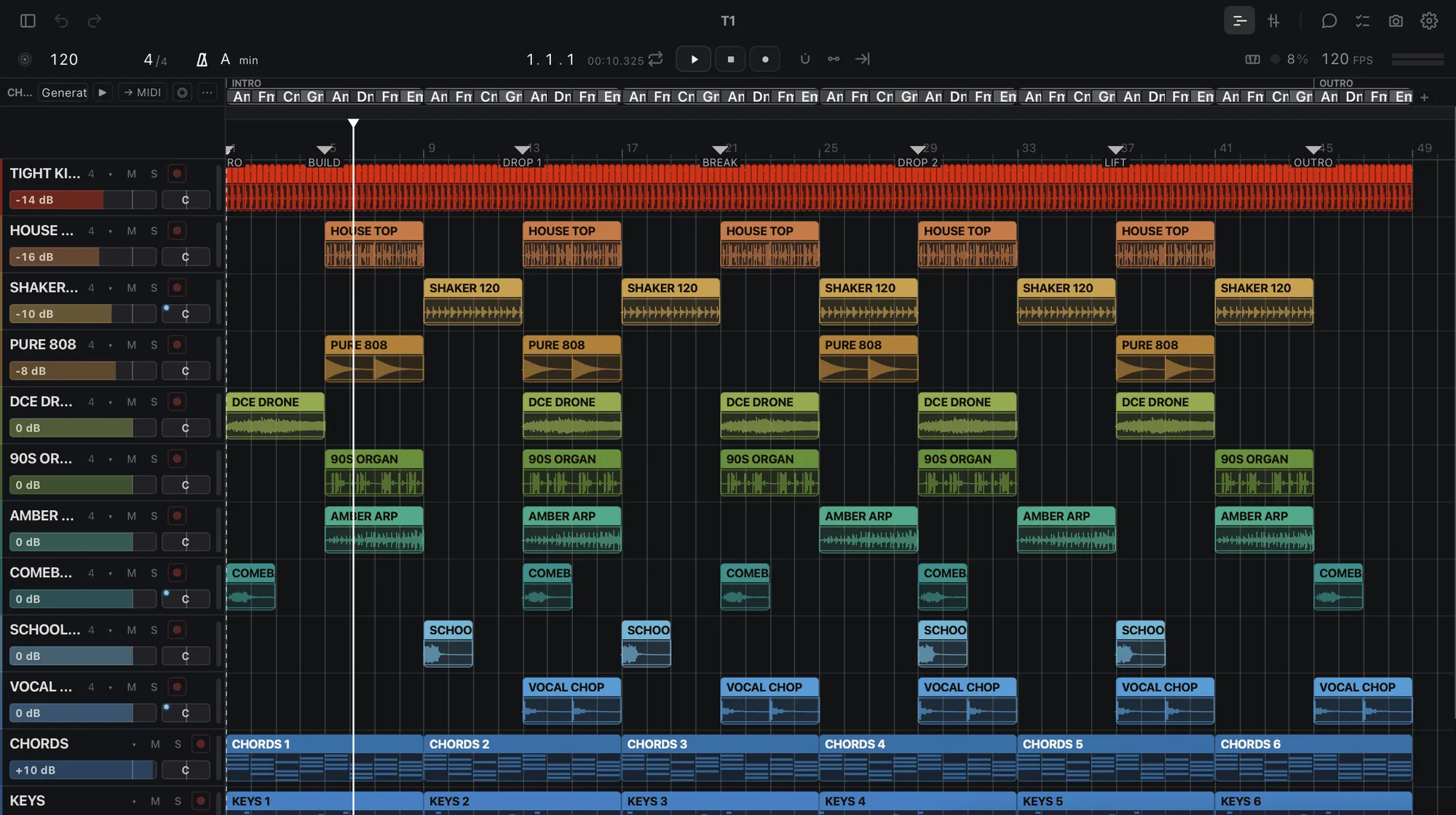
BRAVO arrangement view with 12 tracks

BRAVO

Masterize estas 12 músicas em −14 para o Spotify

Pronto. 12 masters em −14 LUFS, true peak em −1 dB ou menos, e um relatório.

arquivos prontos

Master

−14LUFS

WAV 24

O que ele faz hoje

Você pede o trabalho. Recebe os arquivos.

Masterizar uma música ou um álbum

Processar uma pasta

Separar stems

Avaliar uma mixagem

Afinar uma voz

Aprender o seu som

Entregar stems

A sua IA no comando

Funciona com Claude, Codex e Cursor.

claude · codex · cursor
  • >masterize estas 10 músicas em −14 para o Spotify
  • lookálbum lido: 10 faixas, 38 min
  • domaster × 10 → arquivos
  • okpronto. 10 masters em −14 LUFS, true peak em −1 dB ou menos
  • >o que não está bom na faixa 7?
  • doouvir + avaliar
  • okembolado em 200 Hz, voz 2 dB baixa, aberto demais abaixo de 120 Hz

DAW grátis com IA para Mac e Windows

Um DAW com IA dentro, grátis no seu Mac ou PC.

  • DAWFaixas, clipes, mixer, instrumentos e efeitos.
  • IAUm chat que faz o trabalho, mais a IA que você já usa.
  • MacApple Silicon ou Intel, macOS 13.3 ou mais recente.
  • WindowsWindows 10 ou 11, 64 bits.
  • GrátisA beta não custa nada.

OBRA · BRAVO

BRAVO beta

Verificando o seu acesso…

Perguntas

Perguntas frequentes

O BRAVO é grátis?

Grátis durante a beta. Seus projetos são seus: sempre abrem e exportam, com ou sem plano. Planos pagos serão avisados com pelo menos 30 dias de antecedência. Assine durante a beta e mantenha seu preço de fundador enquanto continuar assinante. Membros OBRA PRO têm BRAVO PRO incluído. Durante a beta, os dados de uso ficam ativados, nunca o seu áudio.

O BRAVO funciona em Mac com Intel ou no Windows?

Sim. No Windows: Windows 10 ou 11, 64 bits. No Mac: Apple Silicon ou Intel com macOS 13.3 ou mais recente (Macs com Intel de 2017 em diante que consigam instalá-lo).

O BRAVO faz a música por mim?

Não. O BRAVO não gera músicas. Ele trabalha com o seu áudio e os seus samples: masteriza, separa, avalia e exporta o que você traz, ouve o resultado e diz o que não está bom.

Qual IA funciona com o BRAVO?

O BRAVO tem o próprio chat na tela Home. Ele também funciona com o Claude (Claude Desktop e Claude Code), o Codex e o Cursor pelo “Connect your AI”, um conector que fica desligado até você ligar e responde localmente, no seu computador.

Como consigo acesso?

Toque em «Baixar BRAVO beta» nesta página, entre ou crie a sua conta OBRA, aceite os termos da beta e baixe o OBRA DSP, que instala o BRAVO.

Baixar BRAVO beta

obra.art
Termos da beta
BETA TERMS · BRAVO Version bravo-terms/2026-11-11.1 1. What this is BRAVO (beta) is a music studio by OBRA (obra.art), in a free beta for Macs with Apple Silicon, distributed through OBRA DSP. It is experimental: it can fail, change or stop being available, and access can be limited or withdrawn. Keep copies of your projects and your audio. 2. Your music is yours Your songs, projects, samples and other material remain yours or their owners'. Using them in BRAVO gives us no rights over them. 3. We do not train on your music We do not use your audio, your projects or your samples to train models. Of what BRAVO learns from your projects we only receive a summary (styles, tempos, keys, roles, plugins and skills) to improve its AI; never the audio, the names or the content. 4. Usage data is required Using BRAVO (beta) requires sharing usage data with OBRA, so we can see what is used, what fails and improve the beta. We collect: app usage events and counts (which parts you use and for how long), the BRAVO version and your system, errors, hangs and unexpected quits with the system crash report (without paths), installed or blocked plugins (name and maker), which AI you use and how often (never what you write to it), the summary of what your profile learns, the outcome of jobs, your ratings (👍/👎) and what you write in a comment or in «what did you expect». We never collect: your audio, the content of your projects, the names of your files, tracks or samples, or what you type to your own connected AI. To stop sharing, leave the beta and delete that data from the privacy control on this page. When you ask the included AI for something, its provider receives what it needs to answer; if you connect your own AI, your account with it applies. The data notice explains the details. 5. Fair use The included AI has a daily cap per account. Access is personal: do not share your account or try to get around the limits. 6. No warranties The beta is provided as is, without any warranty of availability, results or continuity, to the extent the law allows. Nothing here limits the rights the law gives you that cannot be excluded. 7. Public beta You can talk about BRAVO, show it and record it. If you accepted the private-beta agreement, your copy remains available to download. 8. Everything else For anything this text does not cover, OBRA's Terms of Use (obra.art/policies/tos) and Privacy Policy (obra.art/policies/privacy) apply. Questions and bugs: info@obra.art. 9. Your acceptance By ticking the box and choosing “Accept”, you accept this version and the sharing of usage data in point 4. We keep your UID, your email, the language, this text with its SHA-256 fingerprint and the server date. You can download a copy at any time. The OBRA team
info@obra.art