OBRAMacとWindows用の無料AI DAW

BRAVO: The AI DAW.

The Claude Code of DAWs.

ひとりで仕事をするスタジオ。やりたいことを伝えるだけで、あなたのサウンドでミックス、マスタリング、プロデュースします。

  • 無料ベータ
  • Mac(Apple SiliconまたはIntel)とWindows
  • Claude, Codex, Cursorに対応

Good afternoon

What are we making today?

Project or folderOB-1

  • Master
  • Judge the mix
  • Tune the vocal
  • Separate stems

Recent projectsView all

  • Midnight DriveBRAVO
  • Vocal comp v3BRAVO
  • EP masterBRAVO
  • Live setBRAVO
  • Scoring reelBRAVO

作っているのは

プロデューサーが作り、エンジニアが試す。毎日。

OBRAで、現役のプロデューサーが作っています。ミキシングとマスタリングのエンジニアが実際のセッションでテスト。ほぼ毎日、新しいビルドが出ます。

3,000+
OBRAのプロデューサーとエンジニア
672
OB-1がプロジェクト内で実行できる操作
90+
内蔵のスタジオモジュール
毎日
ベータ期間中の新しいビルド

OB-1

独自のAI。求めるものがわかっているミュージシャンのために。

あなたのプロジェクトの中で、あなたのサンプルを使って作業します。一打一打をグリッドに合わせ、結果を聴いて、問題点を伝えます。

  • ディレクターとミュージシャンたちひとりが曲を設計。最大6人がパートを書きます。
  • どのステップも取り消しは1回OB-1の名前入りでバージョンも保存します。
  • 曲を生成することはありませんあなたの音、あなたのライブラリ、あなたのセンス。

Skills

一度やる。@skillと打つ。もうあなたのもの。

いま手作業でやったことをBRAVOがスキルに変え、どのプロジェクトでも繰り返し実行します。

ボーカルスタックスキルの例

  1. リードをキーに合わせてピッチ補正
  2. 3度上と5度上のハーモニーを新規トラックに
  3. ダブルをリードにぴったり合わせる
  4. 全トラックに自分のボーカルチェーン

@skill完了。各ステップ、取り消しは1回。

あなたのAIが操作

Claude CodeとCodexを、あなたのDAWの中に。

チャットで自分のClaudeやCodexを選べます。あなたのアカウント、ツール、メモリを使って、プロジェクト内で作業します。

  • 13のツール
  • あなたのコンピューター上で完結
  • オンにするまでオフ

Claude、Codex、Cursorに対応。

claude · codex · cursor

  • >この10曲をSpotify向けに−14でマスタリングして
  • lookアルバムを読み込み:10曲、38分
  • domaster × 10 → ファイル
  • ok完了。10曲を−14 LUFS、トゥルーピーク−1 dB以下でマスタリング
  • >7曲目の問題は?
  • do試聴 + 診断
  • ok200 Hzがこもり気味、ボーカルが2 dB小さい、120 Hz以下が広がりすぎ

妥協しないプロのために

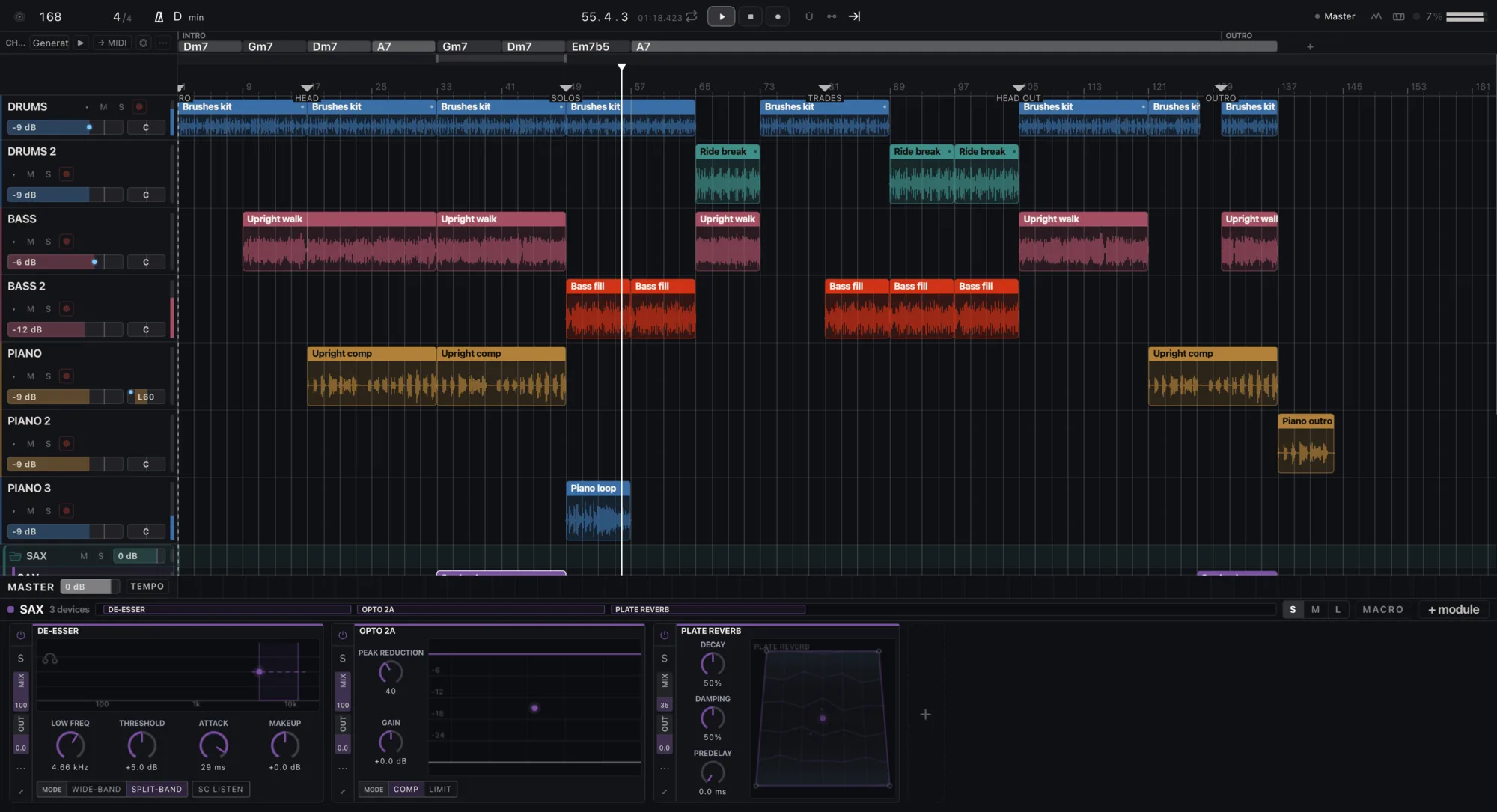
レコードに必要なすべて。最初から内蔵。

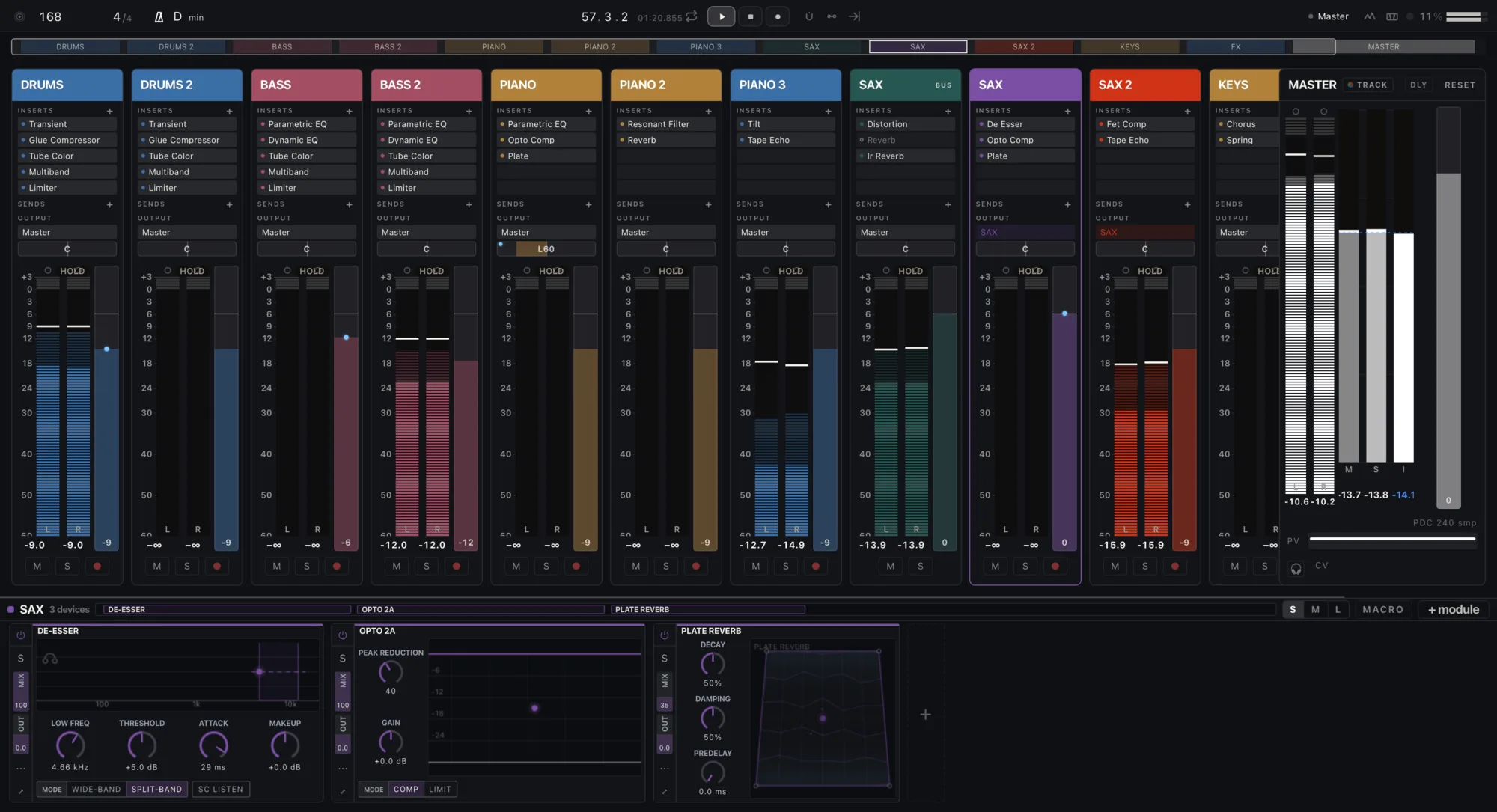
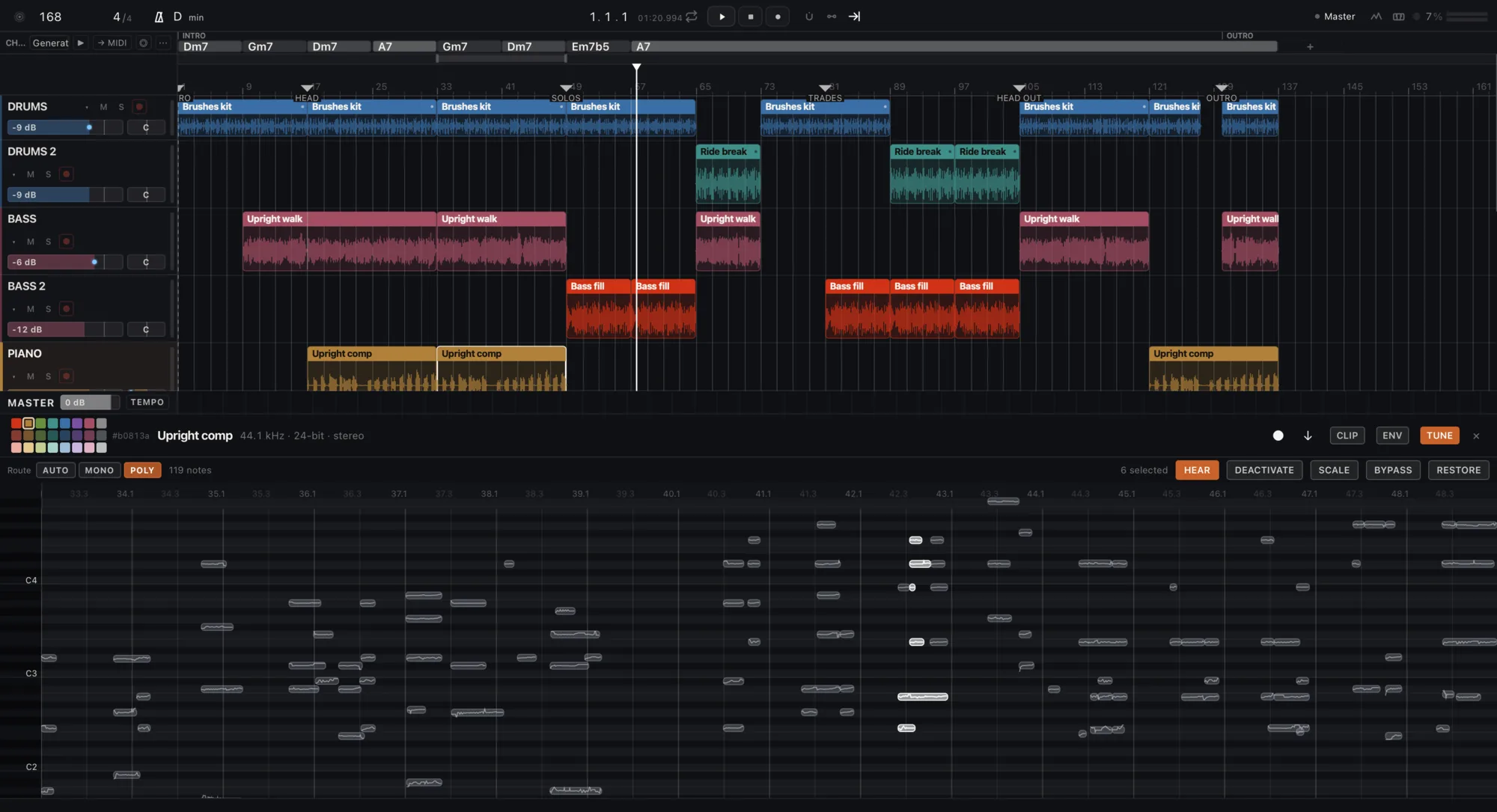
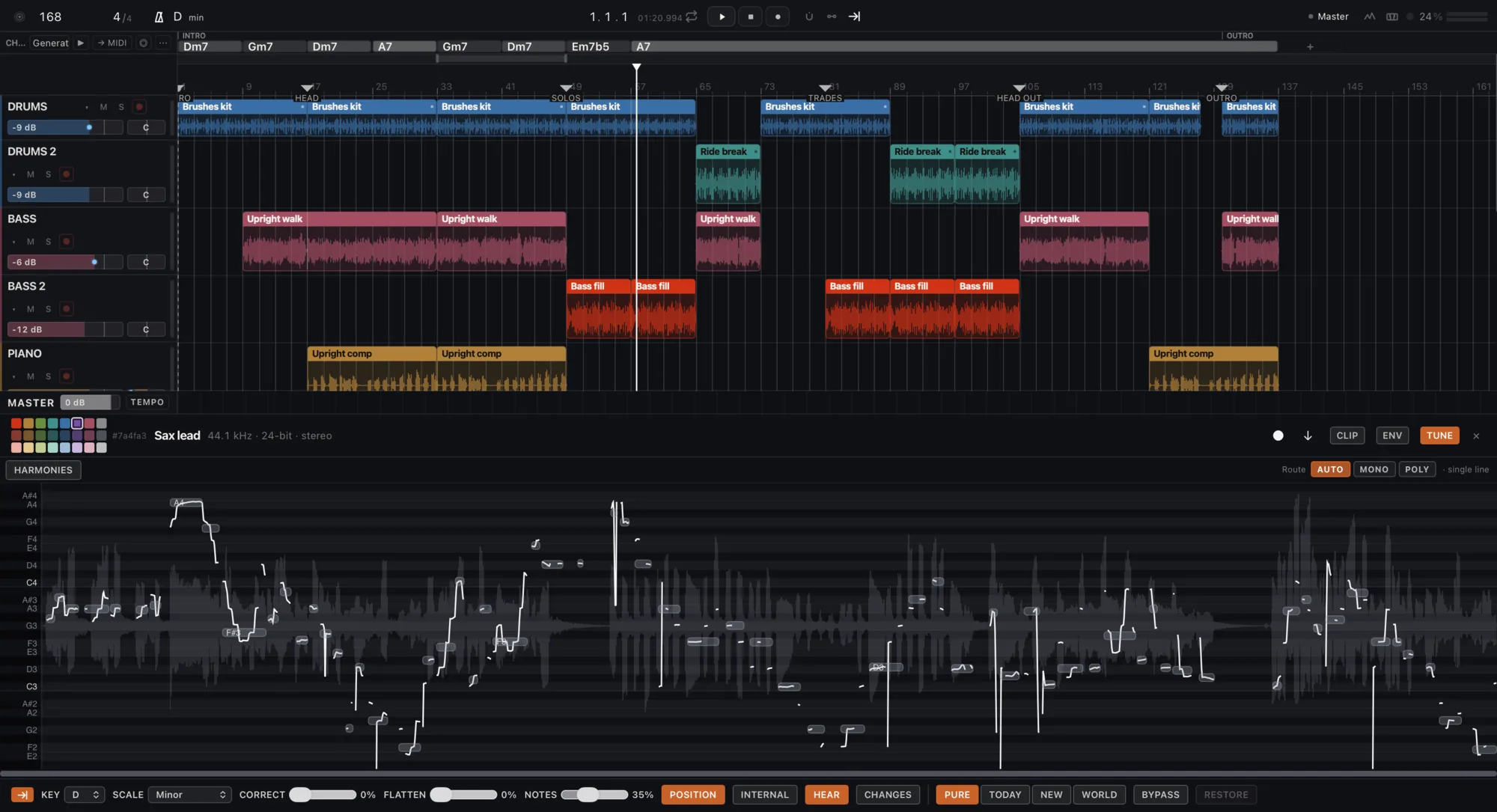
BRAVO: アレンジメントBRAVO: ミキサーBRAVO: ポリフォニックのピッチ補正BRAVO: ボーカルのピッチ補正

ポリフォニックのピッチ編集

コードの中の1音だけを動かせます。どのクリップでも、標準搭載。

ボーカルを揃えて重ねる

ダブルはリードにぴったり。ハーモニーは新規トラックに書き出します。

90以上のスタジオモジュール

ひとつずつ厳選。お使いのVST3とAUプラグインも使えます。

何も隠さないミキサー

オートメーションレーン、グループ、センドとリターン、ラウドネスメーターと位相メーター。

ワープ、コード、テンポ、ビデオ

3つのワープモード、文字で入力できるコードトラック、テンポレーン、ビデオトラック。

ステムもマスターも、あなたのコンピューター上で

どんな曲からも4つのステム。指定したラウドネスでマスタリング。オーディオがアップロードされることはありません。

あなたのサウンドを学習

Ableton LiveとFL Studioのプロジェクトをあなたのコンピューター上で読み、あなたと同じようにサンプルを選びます。

信頼できるエンジン

グラフ全体で遅延を補正。再生でもバウンスでも同じ結果です。

リモート

あなたのセッションを、スマホから。

コードをスキャン。再生、停止、OB-1に声で頼んで、結果を聴く。ハンズフリーで。

いまできること

頼むのは作業。受け取るのはファイル。

曲やアルバムをマスタリング

フォルダをまとめて処理

ステムを分離

ミックスを診断

ボーカルのピッチ補正

あなたのサウンドを学習

ステムを書き出し

NEKO

そして、猫。

あなたのセッションに住み、あなたの音楽を聴いています。楽器を選んでください。

MacとWindows用の無料AI DAW

AIを内蔵したDAWを、あなたのMacまたはPCで無料で。

  • DAWトラック、クリップ、ミキサー、インストゥルメント、エフェクト。
  • AI作業をこなすチャットと、いつものAI。
  • MacApple SiliconまたはIntel、macOS 13.3以降。
  • WindowsWindows 10または11、64ビット。
  • 無料ベータは無料です。

OBRA · BRAVO

BRAVO beta

アクセスを確認しています…

ご質問

よくある質問

BRAVOは無料ですか?

ベータ期間中は無料です。 プロジェクトはあなたのもの。プランの有無にかかわらず、いつでも開いて書き出せます。 有料プランは少なくとも30日前にお知らせします。ベータ期間中に登録すると、登録を続ける限り創設者価格のままです。 OBRA PROメンバーにはBRAVO PROが含まれます。 ベータ期間中は利用データを収集します。音声は収集しません。

Intel MacやWindowsでも使えますか?

はい、使えます。Windowsでは、Windows 10または11(64ビット)。Macでは、Apple SiliconまたはIntelで、macOS 13.3以降が必要です(2017年以降のIntel Macで、このバージョンをインストールできるもの)。

BRAVOが音楽を作ってくれるのですか?

いいえ。BRAVOは曲を生成しません。あなたのオーディオとサンプルを使い、持ち込んだ素材をマスタリング、分離、診断、書き出しして、結果を聴いて問題点を伝えます。

BRAVOで使えるAIは?

BRAVOのHome画面には専用のチャットがあります。さらに「Connect your AI」を使えば、Claude(Claude DesktopとClaude Code)、Codex、Cursorとも連携できます。このコネクターはオンにするまで動かず、あなたのコンピューター上でのみ応答します。

利用するにはどうすればいいですか?

このページの「BRAVO betaを入手」を選び、サインインするかOBRAアカウントを作成して、ベータ規約に同意し、BRAVOをインストールするOBRA AUDIOをダウンロードしてください。

BRAVO betaを入手

obra.art
ベータ規約
BETA TERMS · BRAVO Version bravo-terms/2026-11-11.1 1. What this is BRAVO (beta) is a music studio by OBRA (obra.art), in a free beta for Macs with Apple Silicon, distributed through OBRA DSP. It is experimental: it can fail, change or stop being available, and access can be limited or withdrawn. Keep copies of your projects and your audio. 2. Your music is yours Your songs, projects, samples and other material remain yours or their owners'. Using them in BRAVO gives us no rights over them. 3. We do not train on your music We do not use your audio, your projects or your samples to train models. Of what BRAVO learns from your projects we only receive a summary (styles, tempos, keys, roles, plugins and skills) to improve its AI; never the audio, the names or the content. 4. Usage data is required Using BRAVO (beta) requires sharing usage data with OBRA, so we can see what is used, what fails and improve the beta. We collect: app usage events and counts (which parts you use and for how long), the BRAVO version and your system, errors, hangs and unexpected quits with the system crash report (without paths), installed or blocked plugins (name and maker), which AI you use and how often (never what you write to it), the summary of what your profile learns, the outcome of jobs, your ratings (👍/👎) and what you write in a comment or in «what did you expect». We never collect: your audio, the content of your projects, the names of your files, tracks or samples, or what you type to your own connected AI. To stop sharing, leave the beta and delete that data from the privacy control on this page. When you ask the included AI for something, its provider receives what it needs to answer; if you connect your own AI, your account with it applies. The data notice explains the details. 5. Fair use The included AI has a daily cap per account. Access is personal: do not share your account or try to get around the limits. 6. No warranties The beta is provided as is, without any warranty of availability, results or continuity, to the extent the law allows. Nothing here limits the rights the law gives you that cannot be excluded. 7. Public beta You can talk about BRAVO, show it and record it. If you accepted the private-beta agreement, your copy remains available to download. 8. Everything else For anything this text does not cover, OBRA's Terms of Use (obra.art/policies/tos) and Privacy Policy (obra.art/policies/privacy) apply. Questions and bugs: info@obra.art. 9. Your acceptance By ticking the box and choosing “Accept”, you accept this version and the sharing of usage data in point 4. We keep your UID, your email, the language, this text with its SHA-256 fingerprint and the server date. You can download a copy at any time. The OBRA team
info@obra.art