OBRAKostenlose KI-DAW für Mac und Windows

BRAVO: The AI DAW.

The Claude Code of DAWs.

Das Studio, das von selbst arbeitet. Sag ihm, was du willst, und es mischt, mastert und produziert mit deinen Sounds.

  • Kostenlose Beta
  • Mac (Apple Silicon oder Intel) und Windows
  • Funktioniert mit Claude, Codex und Cursor

Good afternoon

What are we making today?

Project or folderOB-1

  • Master
  • Judge the mix
  • Tune the vocal
  • Separate stems

Recent projectsView all

  • Midnight DriveBRAVO
  • Vocal comp v3BRAVO
  • EP masterBRAVO
  • Live setBRAVO
  • Scoring reelBRAVO

Wer es baut

Von Produzenten gebaut. Von Engineers getestet. Jeden Tag.

Bei OBRA von aktiven Produzenten gebaut. Von Mixing- und Mastering-Engineers in echten Sessions getestet. Fast jeden Tag ein neuer Build.

3.000+
Produzenten und Engineers auf OBRA
672
Aktionen, die OB-1 in deinem Projekt ausführen kann
90+
Studio-Module an Bord
Täglich
Builds während der Beta

OB-1

Unsere eigene KI. Für Musiker, die wissen, was sie wollen.

Sie arbeitet in deinem Projekt, mit deinen Samples. Sie setzt jeden Schlag aufs Raster, hört sich das Ergebnis an und sagt dir, was nicht passt.

  • Ein Dirigent und seine MusikerEiner plant den Song. Bis zu sechs schreiben die Parts.
  • Jeder Schritt ist ein UndoUnd sie speichert Versionen, signiert mit ihrem Namen.
  • Sie generiert nie den SongDeine Sounds, deine Library, dein Geschmack.

Skills

Einmal machen. @skill tippen. Gehört dir.

BRAVO macht aus dem, was du gerade von Hand erledigt hast, einen Skill, den es in jedem Projekt wieder ausführt.

Vocal-StackBeispiel-Skill

  1. Lead-Vocal auf die Tonart tunen
  2. Harmonien eine Terz und eine Quinte höher, auf neuen Spuren
  3. Doubles tight aufs Lead-Vocal ziehen
  4. Meine Vocal-Chain auf allen

@skillFertig. Je ein Undo-Schritt.

Deine KI steuert es

Claude Code und Codex, in deiner DAW.

Wähl im Chat dein eigenes Claude oder Codex. Es arbeitet im Projekt mit deinem Konto, deinen Tools und deinem Gedächtnis.

  • 13 Tools
  • Es bleibt auf deinem Computer
  • Aus, bis du es einschaltest

Funktioniert mit Claude, Codex und Cursor.

claude · codex · cursor

  • >master diese 10 Songs auf −14 für Spotify
  • lookAlbum gelesen: 10 Tracks, 38 min
  • domaster × 10 → Dateien
  • okfertig. 10 Master mit −14 LUFS, True Peak bei −1 dB oder darunter
  • >was passt in Track 7 nicht?
  • dohören + beurteilen
  • okmatschig bei 200 Hz, Vocals 2 dB zu leise, unter 120 Hz zu breit

Für anspruchsvolle Profis

Alles, was eine Platte braucht. Schon drin.

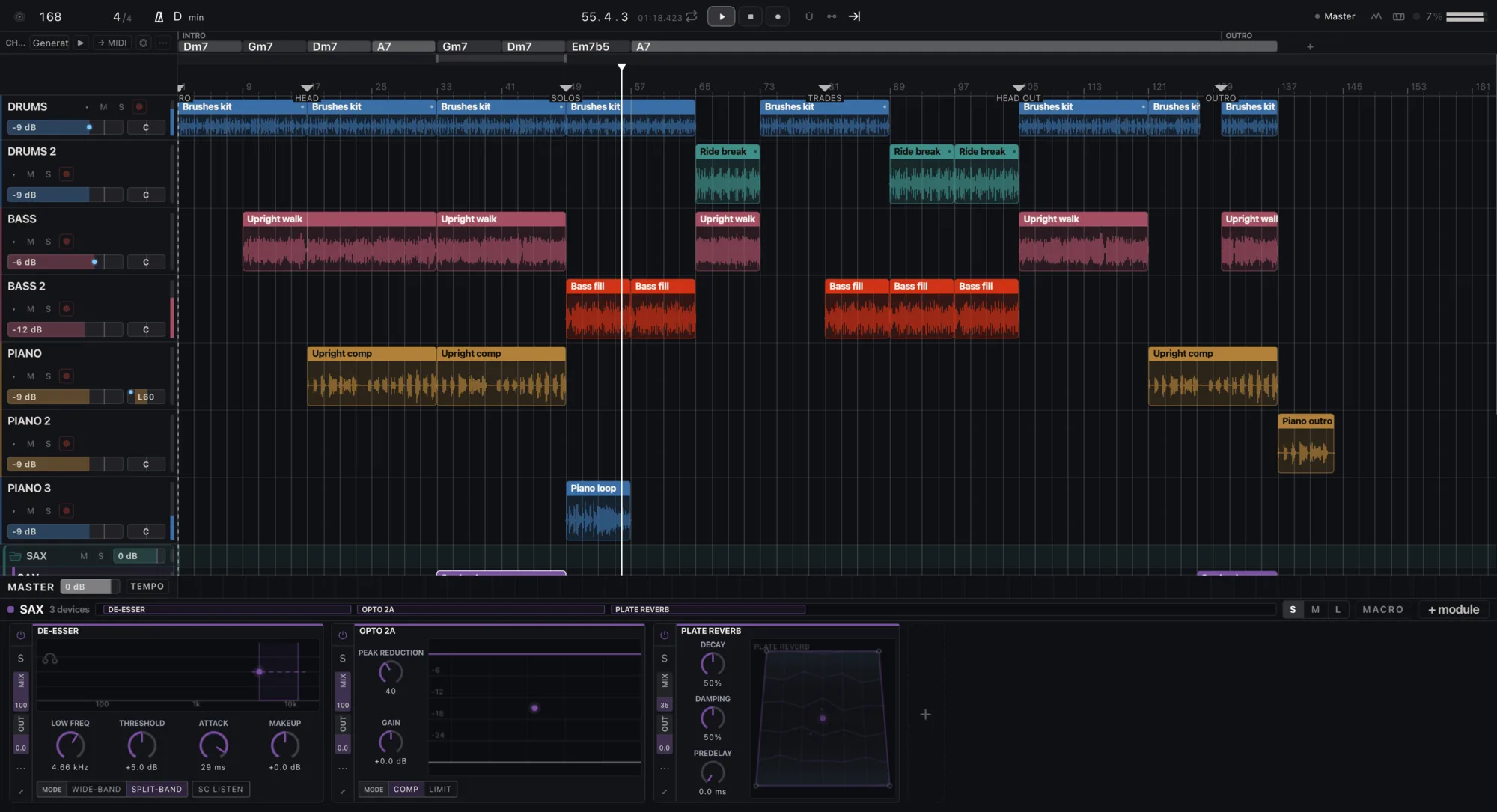
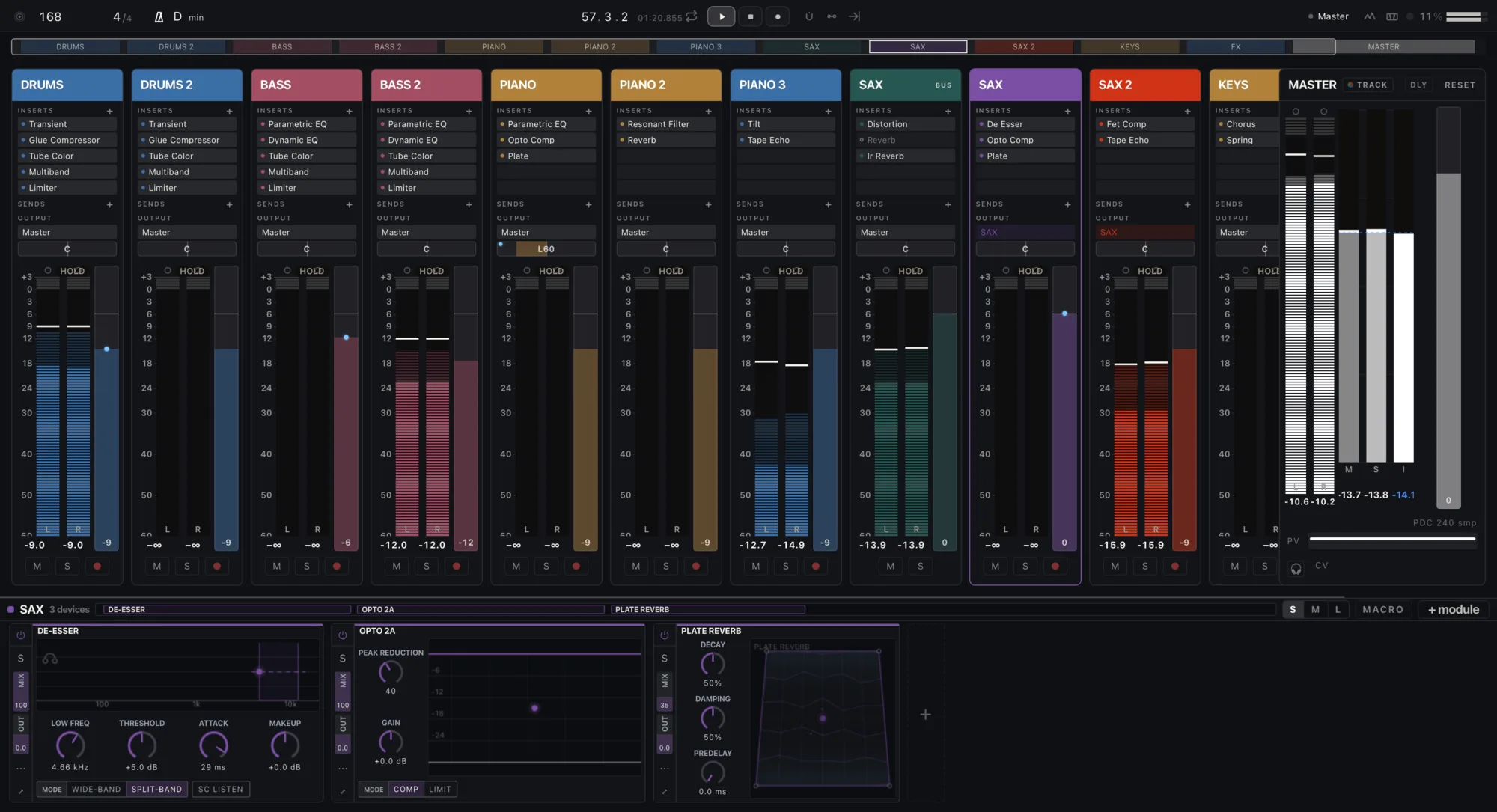
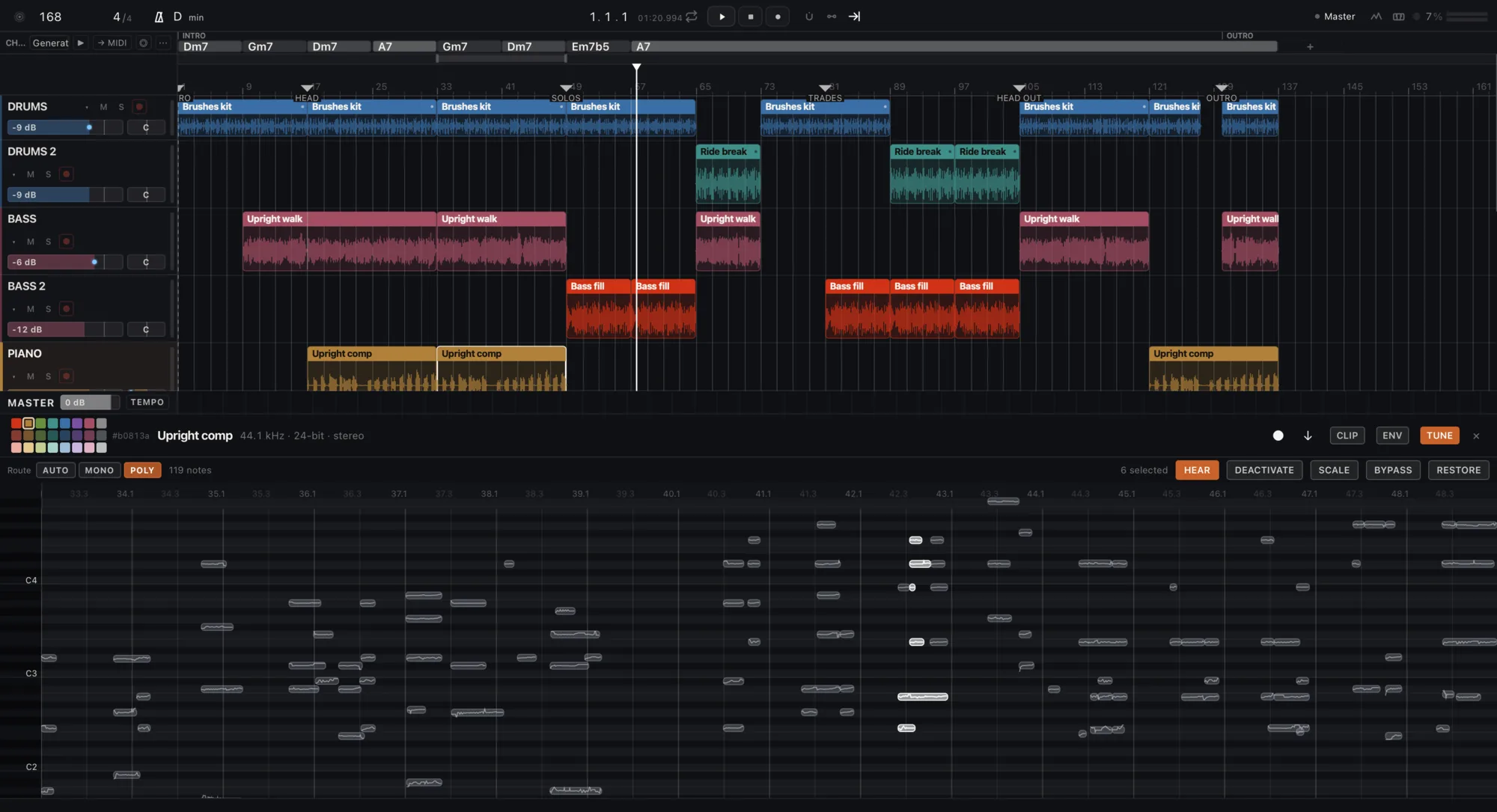
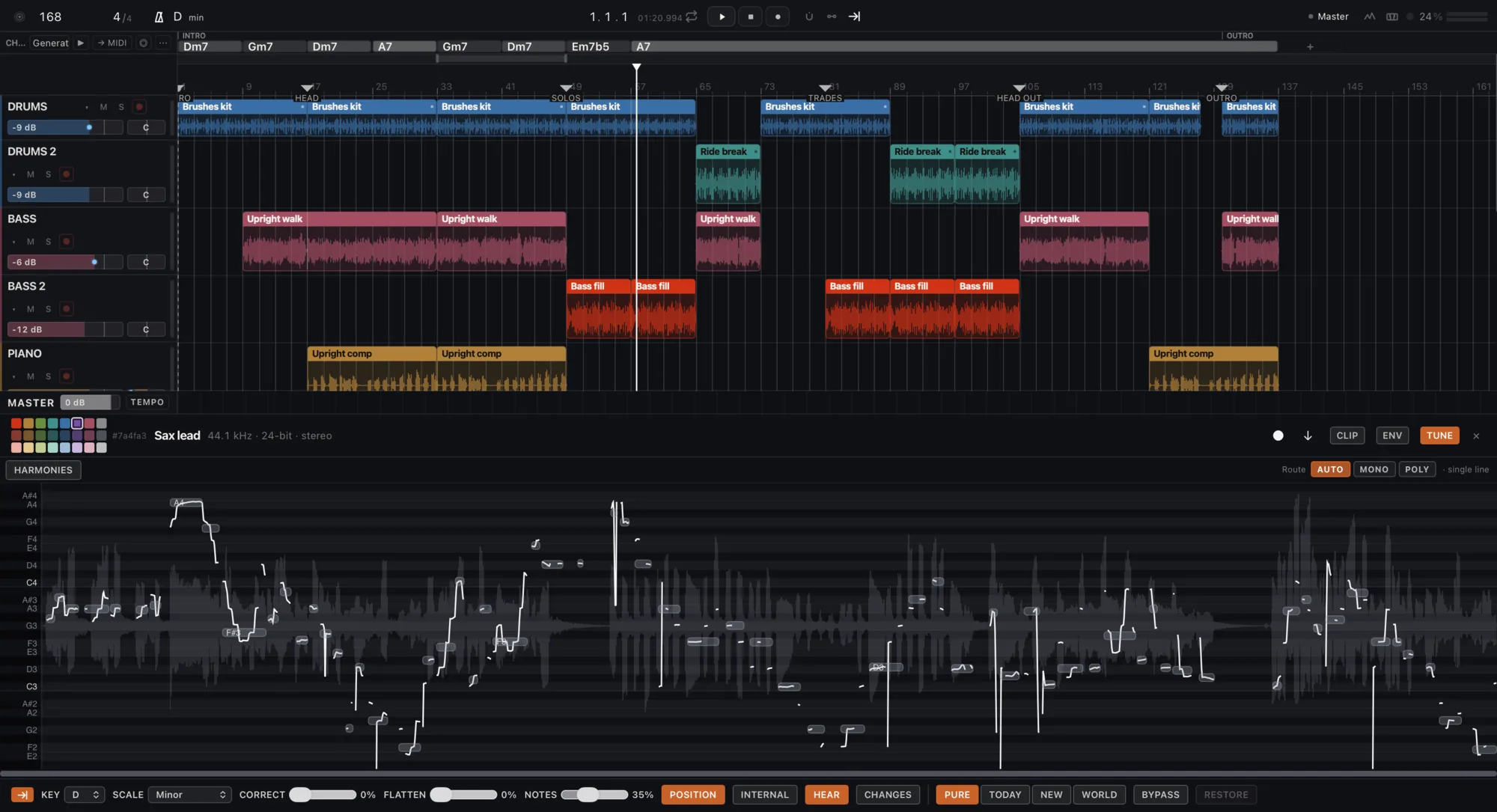
BRAVO: ArrangementBRAVO: MixerBRAVO: Polyphones TuningBRAVO: Vocal-Tuning

Polyphone Tonhöhenbearbeitung

Verschieb eine einzelne Note in einem Akkord. In jedem Clip, eingebaut.

Vocals ausgerichtet und gestackt

Doubles sitzen tight auf dem Lead-Vocal. Harmonien landen auf neuen Spuren.

90+ Studio-Module

Einzeln ausgewählt. Dazu deine VST3- und AU-Plugins.

Ein Mixer, der nichts versteckt

Automationsspuren, Gruppen, Sends und Returns, Lautheits- und Phasenmeter.

Warp, Akkorde, Tempo, Video

Drei Warp-Modi, eine Akkordspur zum Eintippen, eine Tempospur und eine Videospur.

Stems und Master auf deinem Computer

Vier Stems aus jedem Song. Master in der Lautheit, die du willst. Dein Audio wird nie hochgeladen.

Es lernt deinen Sound

Es liest deine Projekte aus Ableton Live und FL Studio, auf deinem Computer, und wählt Samples so aus wie du.

Eine Engine, auf die du dich verlassen kannst

Latenzausgleich über den gesamten Signalgraphen, bei Wiedergabe und Bounce identisch.

Remote

Deine Session, vom Handy aus.

Scann den Code. Play, Stop, frag OB-1 per Sprache und hör dir das Ergebnis an. Freihändig.

Was es heute kann

Auftrag rein. Dateien raus.

Einen Song oder ein Album mastern

Einen Ordner verarbeiten

Stems trennen

Einen Mix beurteilen

Vocals tunen

Deinen Sound lernen

Stems ausliefern

NEKO

Und eine Katze.

Sie lebt in deiner Session und hört deine Musik. Such ein Instrument aus.

Kostenlose KI-DAW für Mac und Windows

Eine DAW mit KI an Bord, kostenlos auf deinem Mac oder PC.

  • DAWSpuren, Clips, Mixer, Instrumente und Effekte.
  • KIEin Chat, der den Job erledigt, plus die KI, die du schon verwendest.
  • MacApple Silicon oder Intel, macOS 13.3 oder neuer.
  • WindowsWindows 10 oder 11, 64 Bit.
  • KostenlosDie Beta kostet nichts.

OBRA · BRAVO

BRAVO beta

Dein Zugang wird geprüft…

Fragen

Häufige Fragen

Ist BRAVO kostenlos?

Kostenlos während der Beta. Deine Projekte gehören dir: Sie lassen sich immer öffnen und exportieren, mit oder ohne Abo. Kostenpflichtige Pläne kündigen wir mindestens 30 Tage vorher an. Wer während der Beta abonniert, behält seinen Gründerpreis, solange das Abo läuft. In OBRA PRO ist BRAVO PRO enthalten. Während der Beta werden Nutzungsdaten erfasst, nie dein Audio.

Läuft BRAVO auf einem Intel-Mac oder unter Windows?

Ja. Unter Windows: Windows 10 oder 11, 64 Bit. Auf dem Mac: Apple Silicon oder Intel mit macOS 13.3 oder neuer (Intel-Macs ab 2017, die es installieren können).

Macht BRAVO die Musik für mich?

Nein. BRAVO generiert keine Songs. Es arbeitet mit deinem Audio und deinen Samples: Es mastert, trennt, beurteilt und exportiert, was du mitbringst, hört sich das Ergebnis an und sagt dir, was nicht passt.

Welche KI funktioniert mit BRAVO?

BRAVO hat einen eigenen Chat auf dem Home-Bildschirm. Außerdem funktioniert es mit Claude (Claude Desktop und Claude Code), Codex und Cursor über „Connect your AI“, einen Connector, der aus bleibt, bis du ihn einschaltest, und lokal auf deinem Computer antwortet.

Wie bekomme ich Zugang?

Wähl auf dieser Seite „BRAVO beta holen“, melde dich an oder erstelle dein OBRA-Konto, akzeptiere die Beta-Bedingungen und lade OBRA AUDIO herunter, das BRAVO installiert.

BRAVO beta holen

obra.art
Beta-Bedingungen
BETA TERMS · BRAVO Version bravo-terms/2026-11-11.1 1. What this is BRAVO (beta) is a music studio by OBRA (obra.art), in a free beta for Macs with Apple Silicon, distributed through OBRA DSP. It is experimental: it can fail, change or stop being available, and access can be limited or withdrawn. Keep copies of your projects and your audio. 2. Your music is yours Your songs, projects, samples and other material remain yours or their owners'. Using them in BRAVO gives us no rights over them. 3. We do not train on your music We do not use your audio, your projects or your samples to train models. Of what BRAVO learns from your projects we only receive a summary (styles, tempos, keys, roles, plugins and skills) to improve its AI; never the audio, the names or the content. 4. Usage data is required Using BRAVO (beta) requires sharing usage data with OBRA, so we can see what is used, what fails and improve the beta. We collect: app usage events and counts (which parts you use and for how long), the BRAVO version and your system, errors, hangs and unexpected quits with the system crash report (without paths), installed or blocked plugins (name and maker), which AI you use and how often (never what you write to it), the summary of what your profile learns, the outcome of jobs, your ratings (👍/👎) and what you write in a comment or in «what did you expect». We never collect: your audio, the content of your projects, the names of your files, tracks or samples, or what you type to your own connected AI. To stop sharing, leave the beta and delete that data from the privacy control on this page. When you ask the included AI for something, its provider receives what it needs to answer; if you connect your own AI, your account with it applies. The data notice explains the details. 5. Fair use The included AI has a daily cap per account. Access is personal: do not share your account or try to get around the limits. 6. No warranties The beta is provided as is, without any warranty of availability, results or continuity, to the extent the law allows. Nothing here limits the rights the law gives you that cannot be excluded. 7. Public beta You can talk about BRAVO, show it and record it. If you accepted the private-beta agreement, your copy remains available to download. 8. Everything else For anything this text does not cover, OBRA's Terms of Use (obra.art/policies/tos) and Privacy Policy (obra.art/policies/privacy) apply. Questions and bugs: info@obra.art. 9. Your acceptance By ticking the box and choosing “Accept”, you accept this version and the sharing of usage data in point 4. We keep your UID, your email, the language, this text with its SHA-256 fingerprint and the server date. You can download a copy at any time. The OBRA team
info@obra.art