OBRADAW gratis con IA per Mac e Windows

BRAVO: The AI DAW.

The Claude Code of DAWs.

Lo studio che lavora da solo. Gli dici cosa vuoi e mixa, masterizza e produce con i tuoi suoni.

  • Beta gratuita
  • Mac (Apple Silicon o Intel) e Windows
  • Funziona con Claude, Codex e Cursor

Good afternoon

What are we making today?

Project or folderOB-1

  • Master
  • Judge the mix
  • Tune the vocal
  • Separate stems

Recent projectsView all

  • Midnight DriveBRAVO
  • Vocal comp v3BRAVO
  • EP masterBRAVO
  • Live setBRAVO
  • Scoring reelBRAVO

Chi lo fa

Fatto da produttori. Testato da fonici. Ogni giorno.

Fatto in OBRA da produttori in attività. Testato in sessioni reali da fonici di mix e mastering. Una nuova build quasi ogni giorno.

3.000+
produttori e fonici su OBRA
672
azioni che OB-1 può eseguire nel tuo progetto
90+
moduli da studio integrati
Ogni giorno
nuove build durante la beta

OB-1

La nostra IA. Per musicisti che sanno cosa vogliono.

Lavora dentro il tuo progetto, con i tuoi sample. Mette ogni colpo in griglia, ascolta il risultato e ti dice cosa non va.

  • Un direttore e i suoi musicistiUno pianifica il brano. Fino a sei scrivono le parti.
  • Ogni passaggio è un annullaE salva versioni firmate con il suo nome.
  • Non genera mai il branoI tuoi suoni, la tua libreria, il tuo gusto.

Skills

Fallo una volta. Scrivi @skill. È tua.

BRAVO trasforma quello che hai appena fatto a mano in una skill che ripete su qualsiasi progetto.

Stack vocaleSkill di esempio

  1. Intonare la voce principale sulla tonalità
  2. Armonie una 3ª e una 5ª sopra, su tracce nuove
  3. Agganciare le doppie alla voce principale
  4. La mia catena voce su tutte

@skillFatto. Un annulla per passaggio.

Lo guida la tua IA

Claude Code e Codex, dentro il tuo DAW.

Scegli il tuo Claude o Codex nella chat. Lavora nel progetto con il tuo account, i tuoi tool e la tua memoria.

  • 13 tool
  • Resta sul tuo computer
  • Spento finché non lo attivi

Funziona con Claude, Codex e Cursor.

claude · codex · cursor

  • >masterizza questi 10 brani a −14 per Spotify
  • lookalbum letto: 10 tracce, 38 min
  • domaster × 10 → file
  • okfatto. 10 master a −14 LUFS, true peak a −1 dB o meno
  • >cosa non va nella traccia 7?
  • doascolto + giudizio
  • okimpastato a 200 Hz, voce bassa di 2 dB, troppo largo sotto i 120 Hz

Per professionisti esigenti

Tutto quello che serve a un disco. Già dentro.

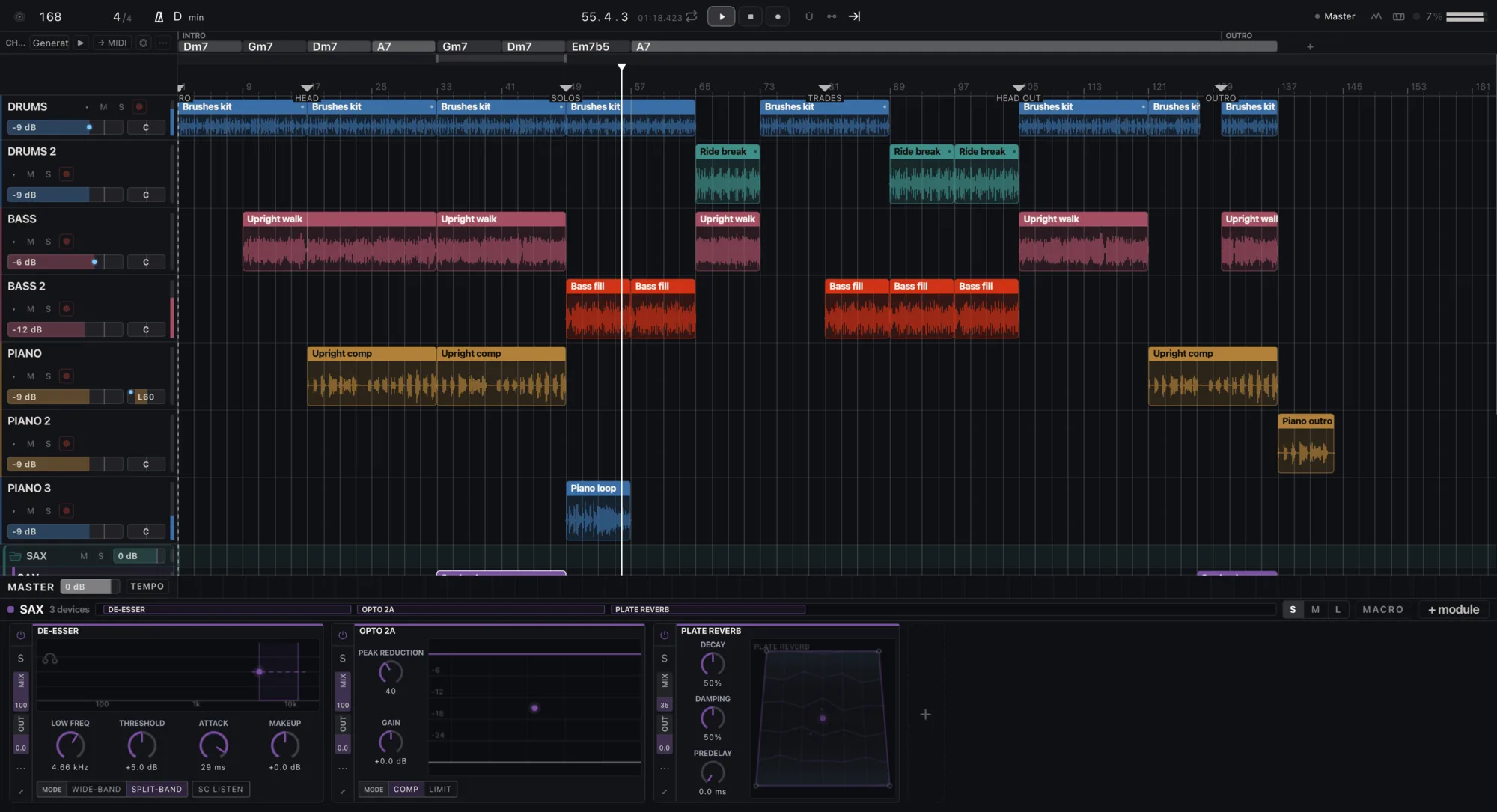
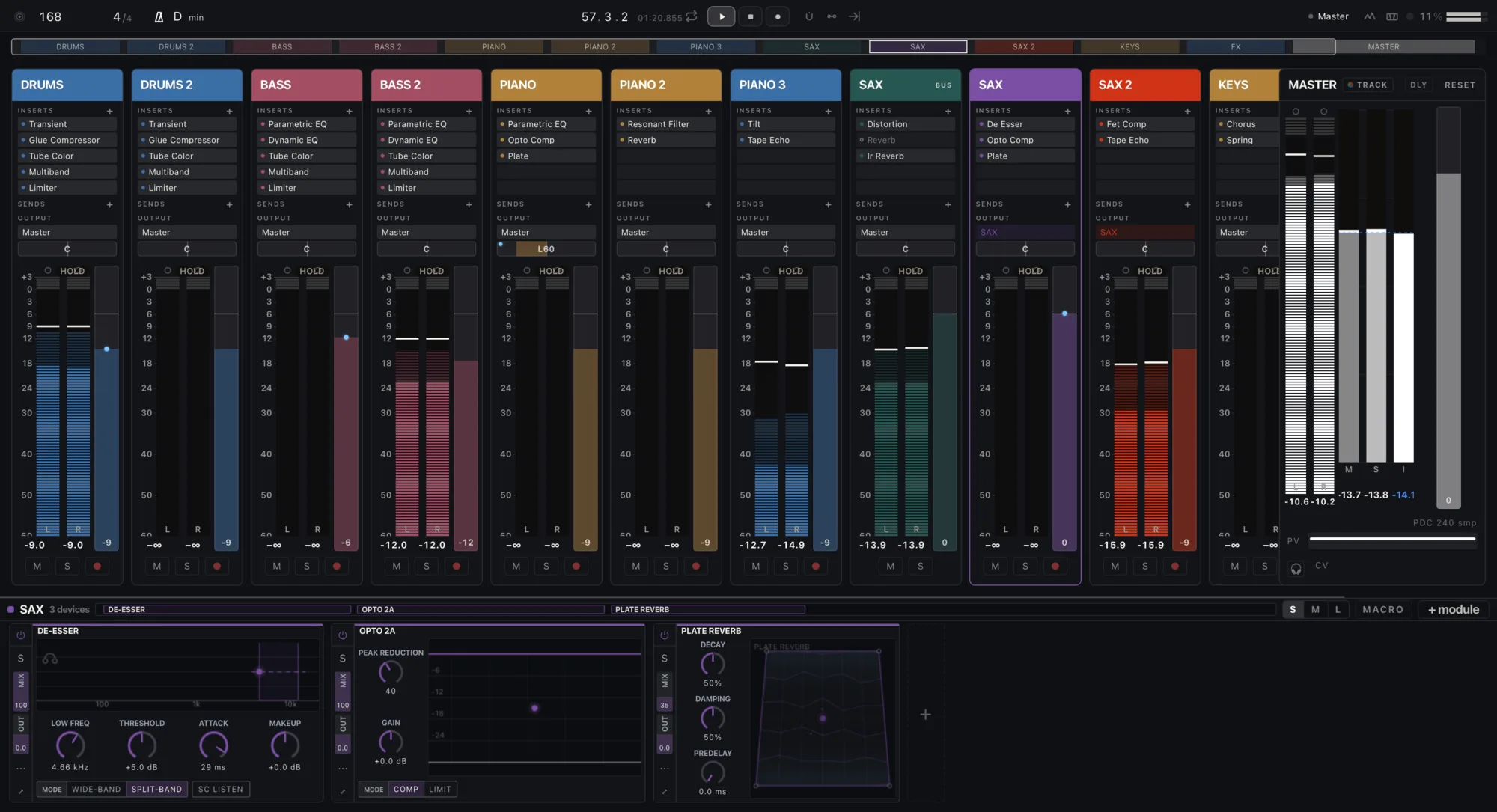
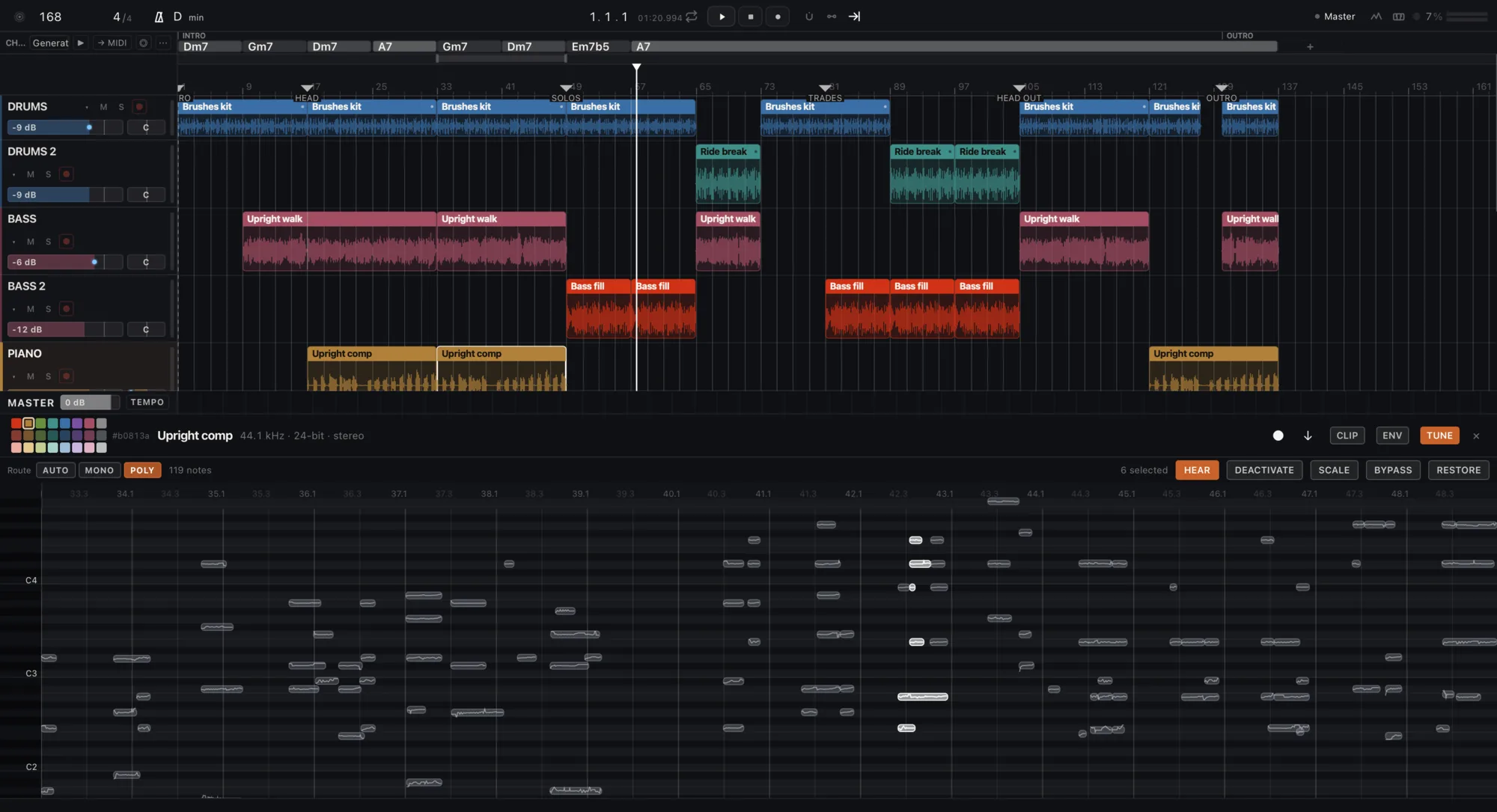
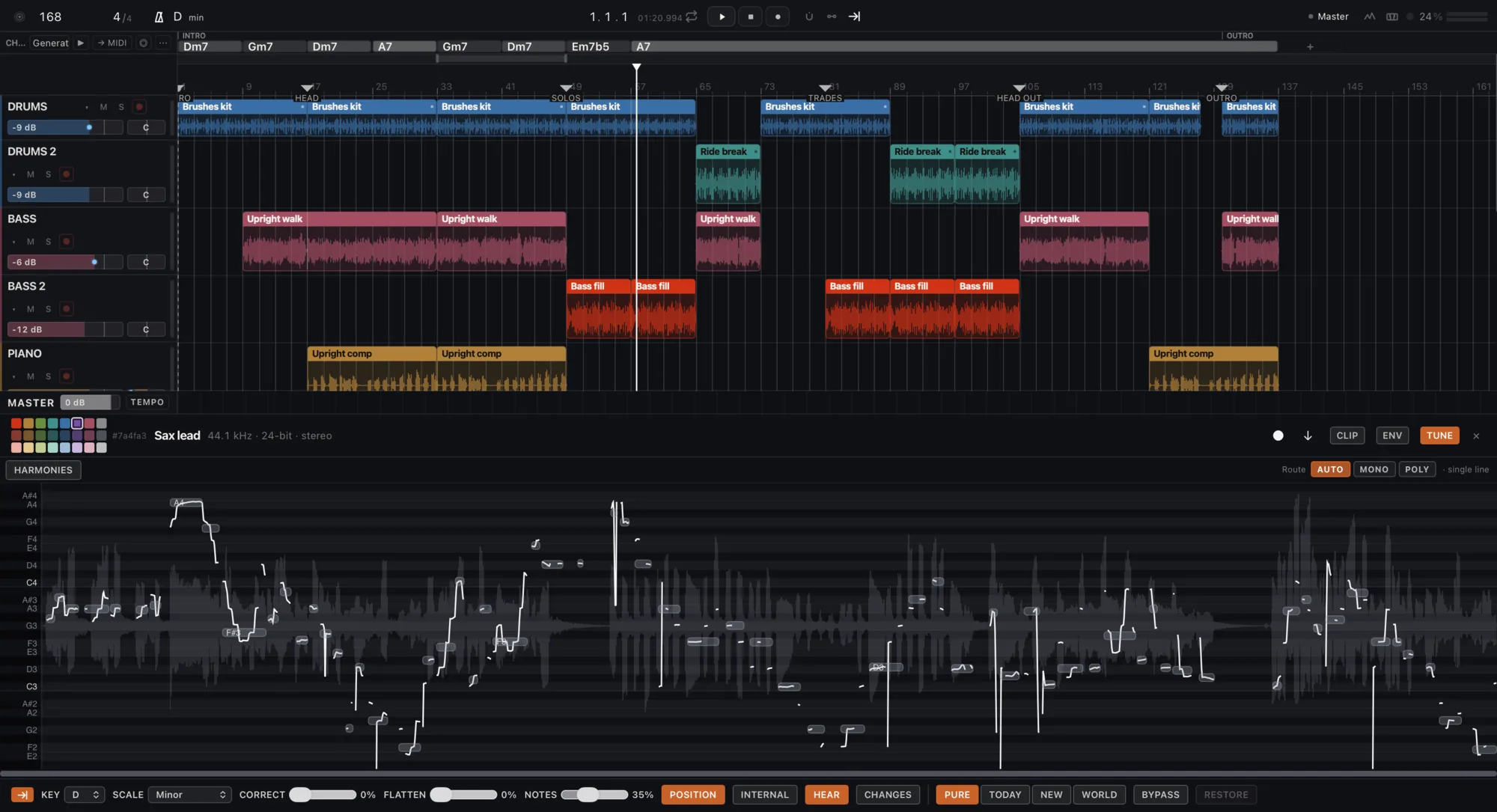
BRAVO: ArrangiamentoBRAVO: MixerBRAVO: Intonazione polifonicaBRAVO: Intonazione voce

Editing polifonico dell’intonazione

Sposta una nota dentro un accordo. Su qualsiasi clip, integrato.

Voci allineate e sovrapposte

Doppie agganciate alla voce principale. Armonie scritte su tracce nuove.

90+ moduli da studio

Scelti uno a uno. Più i tuoi plugin VST3 e AU.

Un mixer che non nasconde niente

Corsie di automazione, gruppi, mandate e ritorni, meter di loudness e di fase.

Warp, accordi, tempo, video

Tre modalità di warp, una traccia accordi in cui scrivi, una corsia del tempo e una traccia video.

Stem e master sul tuo computer

Quattro stem da qualsiasi brano. Master al loudness che chiedi. Il tuo audio non viene mai caricato online.

Impara il tuo suono

Legge i tuoi progetti di Ableton Live e FL Studio, sul tuo computer, e sceglie i sample come fai tu.

Un motore di cui fidarti

Latenza compensata su tutto il grafo, uguale in riproduzione e nel bounce.

Remoto

La tua sessione, dal telefono.

Inquadra il codice. Play, stop, chiedi a OB-1 a voce e ascolta il risultato. A mani libere.

Cosa fa oggi

Chiedi il lavoro. Ricevi i file.

Masterizza un brano o un album

Elabora una cartella

Separa gli stem

Giudica un mix

Intona una voce

Impara il tuo suono

Consegna gli stem

NEKO

E un gatto.

Vive nella tua sessione e ascolta la tua musica. Scegli uno strumento.

DAW gratis con IA per Mac e Windows

Un DAW con l’IA dentro, gratis sul tuo Mac o PC.

  • DAWTracce, clip, mixer, strumenti ed effetti.
  • IAUna chat che fa il lavoro, più l’IA che usi già.
  • MacApple Silicon o Intel, macOS 13.3 o successivo.
  • WindowsWindows 10 o 11, 64 bit.
  • GratisLa beta non costa niente.

OBRA · BRAVO

BRAVO beta

Verifica del tuo accesso…

Domande

Domande frequenti

BRAVO è gratis?

Gratis durante la beta. I tuoi progetti sono tuoi: si aprono e si esportano sempre, con o senza piano. I piani a pagamento saranno annunciati con almeno 30 giorni di preavviso. Se ti abboni durante la beta, mantieni il prezzo da fondatore finché resti abbonato. Con OBRA PRO hai BRAVO PRO incluso. Durante la beta i dati di utilizzo sono attivi, mai il tuo audio.

BRAVO funziona su un Mac Intel o su Windows?

Sì. Su Windows: Windows 10 o 11, 64 bit. Su Mac: Apple Silicon o Intel con macOS 13.3 o successivo (i Mac Intel dal 2017 in poi che possono installarlo).

BRAVO fa la musica al posto mio?

No. BRAVO non genera brani. Lavora con il tuo audio e i tuoi sample: masterizza, separa, giudica ed esporta quello che porti, ascolta il risultato e ti dice cosa non va.

Quale IA funziona con BRAVO?

BRAVO ha la sua chat nella schermata Home. Funziona anche con Claude (Claude Desktop e Claude Code), Codex e Cursor tramite «Connect your AI», un connettore che resta spento finché non lo attivi e risponde in locale, sul tuo computer.

Come ottengo l’accesso?

Scegli «Ottieni BRAVO beta» in questa pagina, accedi o crea il tuo account OBRA, accetta i termini della beta e scarica OBRA AUDIO, che installa BRAVO.

Ottieni BRAVO beta

obra.art
Termini della beta
BETA TERMS · BRAVO Version bravo-terms/2026-11-11.1 1. What this is BRAVO (beta) is a music studio by OBRA (obra.art), in a free beta for Macs with Apple Silicon, distributed through OBRA DSP. It is experimental: it can fail, change or stop being available, and access can be limited or withdrawn. Keep copies of your projects and your audio. 2. Your music is yours Your songs, projects, samples and other material remain yours or their owners'. Using them in BRAVO gives us no rights over them. 3. We do not train on your music We do not use your audio, your projects or your samples to train models. Of what BRAVO learns from your projects we only receive a summary (styles, tempos, keys, roles, plugins and skills) to improve its AI; never the audio, the names or the content. 4. Usage data is required Using BRAVO (beta) requires sharing usage data with OBRA, so we can see what is used, what fails and improve the beta. We collect: app usage events and counts (which parts you use and for how long), the BRAVO version and your system, errors, hangs and unexpected quits with the system crash report (without paths), installed or blocked plugins (name and maker), which AI you use and how often (never what you write to it), the summary of what your profile learns, the outcome of jobs, your ratings (👍/👎) and what you write in a comment or in «what did you expect». We never collect: your audio, the content of your projects, the names of your files, tracks or samples, or what you type to your own connected AI. To stop sharing, leave the beta and delete that data from the privacy control on this page. When you ask the included AI for something, its provider receives what it needs to answer; if you connect your own AI, your account with it applies. The data notice explains the details. 5. Fair use The included AI has a daily cap per account. Access is personal: do not share your account or try to get around the limits. 6. No warranties The beta is provided as is, without any warranty of availability, results or continuity, to the extent the law allows. Nothing here limits the rights the law gives you that cannot be excluded. 7. Public beta You can talk about BRAVO, show it and record it. If you accepted the private-beta agreement, your copy remains available to download. 8. Everything else For anything this text does not cover, OBRA's Terms of Use (obra.art/policies/tos) and Privacy Policy (obra.art/policies/privacy) apply. Questions and bugs: info@obra.art. 9. Your acceptance By ticking the box and choosing “Accept”, you accept this version and the sharing of usage data in point 4. We keep your UID, your email, the language, this text with its SHA-256 fingerprint and the server date. You can download a copy at any time. The OBRA team
info@obra.art